
Updating the plugins
Updates are provided by ARDOIZA, directly in WordPress. There is nothing to download.
- In WordPress, open “Dashboard”, then “Updates”.
- Tick the ARDOIZA plugins offered, then click “Update Plugins”.
- Open “Licence” in the plugin menu: the “Plugin version” line says “up to date”.
Your website checks for new versions several times a day. Each archive is checked before it is installed: an archive altered on the way is refused.
Your settings, your menu, your orders and your bookings are never touched by an update.
Changing website or domain name
Your key counts the websites using it: one website with the Basic plan, three with the Pro plan. A new domain name counts as a new website. So you need to free up the old one.
From the old website, if you can still reach it. Open “Licence” in the plugin menu, then click “Remove the key from this site”. Deactivating the plugin also frees up the place.
From your customer area, in every case. Open Licence and plugin, “Activated websites” list. Click “Unlink” next to the old website. You will be asked for a code from your authenticator app.
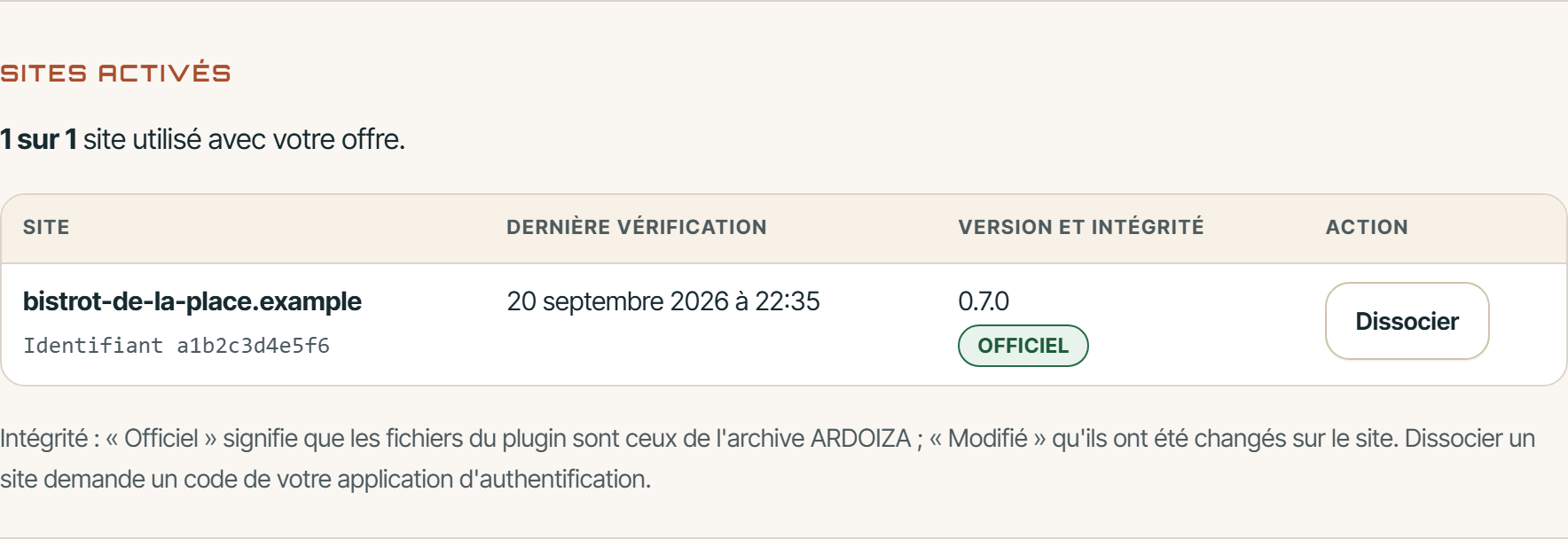
Then install the plugin on the new website and paste the same key. The website appears in “Activated websites” after the first check.
My licence is refused: what should I do?
Two screens tell you why. In WordPress, the plugin's “Licence” screen shows the status and its explanation. In your customer area, Licence and plugin lists the “Latest checks”, with the result of each one.
Here is each reason, and what to do.
Key entered incorrectly
A character is missing or has been changed. The key has the form ARDZ-XXXXX-XXXXX-XXXXX-XXXXX. Reveal it again in your customer area, click “Copy”, then paste it in full.
Unknown key, or old key
The key does not exist, or it has been replaced. After a click on “Generate a new key”, the old key stops working immediately. Copy the current key from your customer area, and enter it on each of your websites.
Plan without the plugin
Your current plan does not include the WordPress plugin. The plugin is included in the Basic and Pro plans. Change plan from My plan.
Website limit reached
All the websites in your plan are in use. Unlink a website you no longer use, then click “Check now” in WordPress. You can also move to the Pro plan.
Access suspended
Your licence is no longer validated, most often because a payment has not gone through for more than seven days: the app no longer receives your orders, your website no longer accepts online orders or bookings, and plugin downloads are refused. Update your payment method in Billing: everything resumes as soon as the payment goes through. If your account was suspended by our team, write to us from My requests.
Grace period
This is not a refusal. Your last payment did not go through, or your website could not reach us. After a declined payment, your licence stays valid for seven days. Settle the payment, or click “Check now”. Without payment after fourteen days, your account returns to the Menu plan.
Waiting to be checked
Your key is saved, but your website has not received an answer yet. Click “Check now”. If it keeps failing, your host may be blocking outgoing connections: ask them to allow app.ardoiza.fr.
Last service answer expired
The last valid answer from the licence service has expired (it is valid for 48 hours at most) and your website could not get a new one. Check that it can connect to the internet, then click “Check now”.
Licence data unreadable or altered
The data saved on your website has been altered. It is ignored. Click “Check now” to receive new data.
Too many requests
Your website checked its key too often in a short time. Wait a few minutes: the next check will go through.
The server clock
The “Licence” screen reports a time difference of more than five minutes. Ask your host to set the server to the correct time.
My key has been leaked
Open Licence and plugin and click “Generate a new key”. The old key is revoked immediately. Reveal the new one, then enter it in WordPress on each of your websites.
Nothing matches
Write to us from My requests. Give the address of your website and the exact message on the “Licence” screen. Never send us your key.